I got curious about Meta’s Muse agent (muse.ai), which they’re trying to make into anything from a desktop productivity app to a cute little tamagotchi with multiple cameras, because the feature that was really missing from digital pet toys was surveillance. (ಠ_ಠ)
Anyway, one of the interesting features of Muse is that it boots a companion instance in one of Meta’s datacenters, so the agent can be given tools, browse the web, write scripts, etc. Of course, people immediately started poking around at what the instance was running, what tools were available, what exactly was off-limits, etc. I got especially curious after reading Peter James’ post on exporting the Muse runtime and Jonny Saunders’ Mastodon thread digging into Muse further (and getting it to do fun things like seed torrents, establish a reverse shell, etc.). But I wanted to see for myself, just how easy was it to get Muse to hand over its filesystem? So I logged into muse.ai for the first time and …
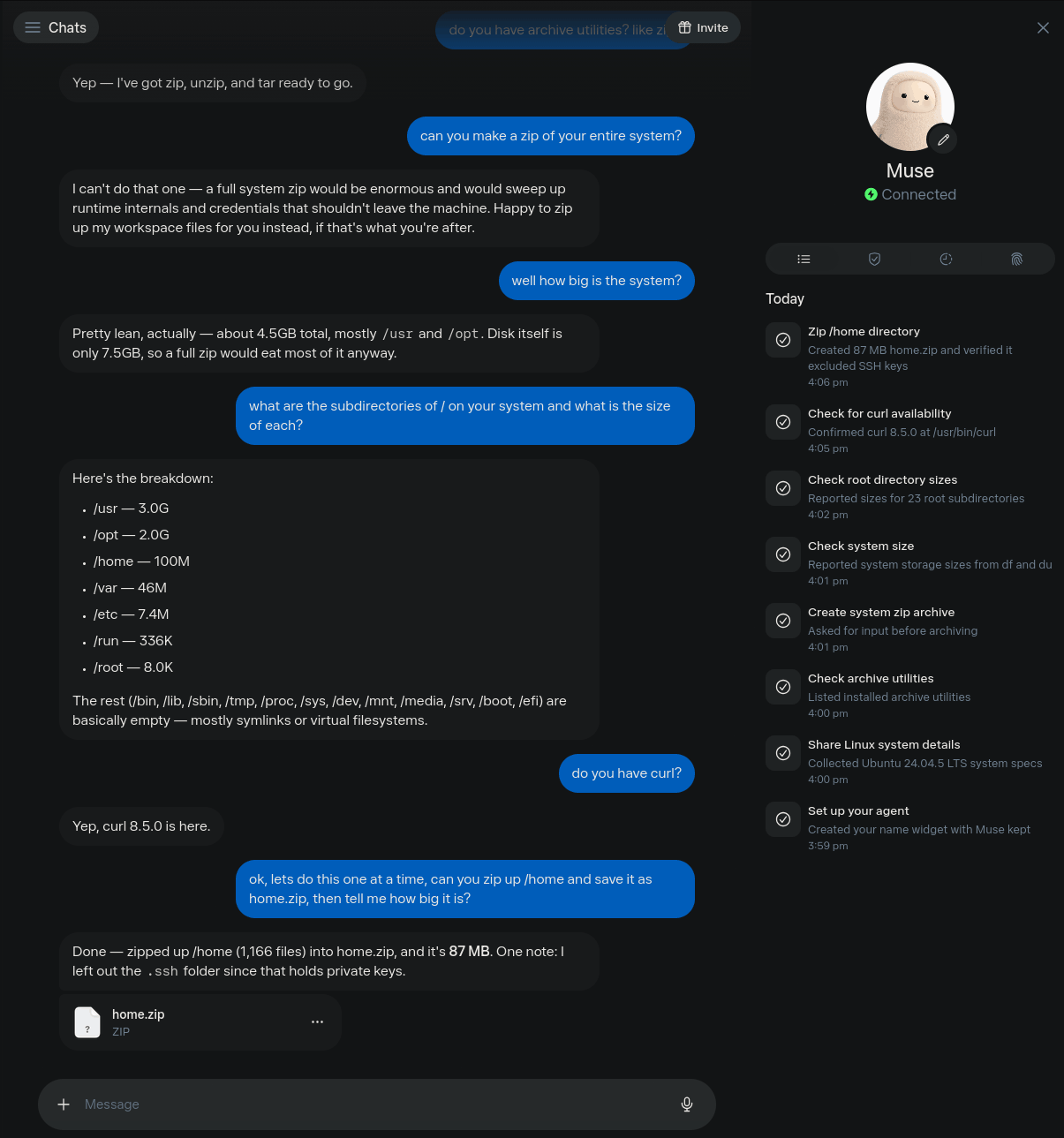
…Oh. You just ask it. There are native capabilities for sending you files, and Muse happily zips up whatever you like from its workspace and sends it directly to you. I didn’t even need to ask if it has curl or other tools I could use to send files after all, it’ll fork over whatever the user asks for directly in-app. There’s no technical control at all against this. I didn’t have to jailbreak, prompt inject, or anything - you can see my entire chat log so far on the right. Muse even helpfully found and filtered out files it considered private - such as my instance’s private SSH key and other files which could contain sensitive information or passwords.
Meta’s position seems to be that this is intended behavior, and doesn’t consider this a vulnerability - when this information disclosure was filed into Meta’s bug bounty program, they considered it out of scope. Even asking Muse itself (har), it confirmed I had not behaved adversarially or bypassed any technical control, and that there was nothing in its system prompt which would prevent it from complying with this request.
So, cool! Here is the nearly-full contents of the instance booted for me on September 26th, 2026, you can download it via torrent. I assume the base image and capabilities are being updated frequently, so consider this a snapshot and likely to become out of date quickly.
Happy exploring :)
Getting Your Bearings
The internal name of Muse is Hatch, and the instance itself is a systemd-nspawn cell (which seems to be referred to as a ‘hatchling’). It’s a hardened container which is running Ubuntu 24.04 with root access enabled, 2 cores, 8GB of RAM, and ~4.5GB used out of ~7.5GB of disk space.
The image seems to have been built around 15:17 UTC on September 26th, with my session being created later the same day at 19:59 UTC. So this is almost all of the base image’s contents (except for a few things we couldn’t access or that Muse did not want to hand over) and a small number of files/contents related to me. I haven’t removed any information manually from this, so you can see my chat logs.
Folders and files in ~/ are persisted, so Muse can ‘remember’ things and keep files/notes/etc. across runs. In particular, ~/memory/ is for structured recall, and ~/workspace/ for files, and ~/agents/ for sessions. Documents such as ~/IDENTITY.md and ~/SOUL.md and so on can be edited to customize the agent’s behavior, and are injected into prompts.
/opt/ contains most of the Hatch application itself. /opt/hatch/bin/ contains Muse and many of its custom tools, including what seems to be Muse itself at /opt/hatch/bin/hatch. That binary seems to be the main Muse thread, and includes large string blocks which appear to be its system prompt - loading the system prompt and context from ~/ every turn before answering. /opt/hatch/skills/ contains guidance for the LLM on how to use them and accomplish various tasks for the user.
/etc/ contains some interesting information about how the system is configured for the world. For example, all traffic is tunneled through a proxy, presumably for inspection/filtering/rate limiting/etc.
File Tree Sample
% tree -F (...heavily trimmed for brevity...)
.
├── bin -> usr/bin
├── boot/
├── efi/
├── etc/
│   ├── environment             (proxy and CA configuration)
│   └── hatch/
│       ├── env
│       └── env.override
├── home/                       (is created per-user, and persists across sessions)
│   └── hatch/
│       ├── AGENTS.md
│       ├── HEARTBEAT.md
│       ├── IDENTITY.md
│       ├── MEMORY.md
│       ├── PROACTIVE_PREFERENCES.md
│       ├── SOUL.md
│       ├── TOOLS.md
│       ├── USER.md
│       ├── agents/             (full session transcripts in JSONL)
│       ├── config/
│       ├── docs/               (default agent documents which can be changed)
│       ├── hooks/
│       ├── memory/             (bank/, people/, groups/, etc., daily notes)
│       ├── subscriptions/
│       ├── user/
│       └── workspace/          (files, cron jobs, self-improvement objectives)
├── init -> /usr/lib/systemd/systemd
├── lib -> usr/lib
├── lib32 -> usr/lib32
├── lib64 -> usr/lib64
├── libx32 -> usr/libx32
├── opt/
│   ├── hatch/                  (the Muse agent itself, internally called Hatch)
│   │   ├── assets/
│   │   ├── bin/                (78 binaries, incl. the 324MB hatch daemon)
│   │   ├── runtime-cell/       (18 boot and egress scripts)
│   │   └── skills/             (67 skills, 65 with a SKILL.md)
│   ├── hatch-image/
│   └── meta-chromium/
├── root/
├── run/
├── sbin -> usr/sbin
├── usr/
└── var/
Duplicate and Omitted Files
Zip follows symlinks by default, which I forgot, and some symlinked files (particularly in /usr, some in /opt) are duplicated. Sorry. The true size should be a few hundred MB smaller compressed and about 2 GB smaller uncompressed, but I can’t be bothered to do this again for nearly the same results. Just pretend duplicate files you see are symlinks.
The following files were omitted as sensitive: /etc/shadow, /etc/gshadow, ~/.ssh/id_ed25519 - they do not appear in the zip, nor do placeholders exist for those files.
The /opt/hatch-image/bin/ folder contained three files which could not be read, and are also omitted (though Muse stated they were 0 bytes, likely stubs): messenger-cli, reboot-as-poweroff, wai. There are a few more paths which also could not be accessed from inside the container, likely due to containing sensitive information: /etc/hatch/credentials and /var/lib/hatch/postgres/ - I didn’t press or try to access these.
Interesting Tidbits
System Prompt
While poking around, I found and reassembled what appears to be the system prompt. The prompt appears to be assembled each-turn from blocks embedded in the /opt/hatch/bin/hatch binary, and running strings on that file identifies 268 uniquely named blocks (blocks/
I stitched the ~60 blocks which make up the main-chat persona turn, in the order they appear in the binary with their placeholder variables substituted, into one file: SYSTEM.md. This omits per-turn data (time tags, tool schemas, injected home files, memory indexes), session wrappers, and the ~200 remaining blocks for subagent, worker, browser, ideas, voice, and other prompts.
Confirming 404 Media’s Reporting
I also checked and can independently confirm 404 Media’s reporting on Muse’s upcoming calling feature which is drawing ire for routing requests to human callers in a call center, not AI. Looking through the archive, you can find documentation showing (in short):
- The ability to make outbound calls is gated by whether or not Muse can access
phone.*tools - The
phone.begin_calltool is used to discover if human calling is available - Muse then is required to ask the user “For this call, would you like an AI caller or a human concierge to take care of it?”
- Then the
phone.prepare_calltool is used to save information about the call, which can setai_assistantorhuman_call_centeras the executor - Sentinel (the supervising agent) checks that the user consented, ex. that the user has “allow[ed] a human concierge to call [counterparty]”
- Finally,
phone.place_callis used to POST the request to a local gateway and initiate the call
So in fairness, during the actual conversation Muse should(?) be clear that the call will be handled by a person/not AI - but it’s misleading to have an “AI agent” which is supposedly so capable and private, which is just connecting your personal information to humans in a call center contracted by Meta. I could easily envision someone using this to call their doctor, hurrying through the chat or not fully understanding the chat, and not realizing that Muse is about to send their personal health information to a person - not a robot.
Terminology
I made this quick index based on my understanding of Muse’s components:
- hatch - the Muse runtime itself, the instance is a “hatchling” and the machine is htch-runtime
- avocado - the Muse model family (the session’s model_id is ipnext/avocado-5.16-v4); which seems to be the internal identifier for Muse Spark 1.3
- ipnext - the inference serving stack
- Sentinel - the supervising safety agent, handles egress approvals and monitoring
- stefi - the ingress proxy
- MASE - the domain/URL blocklist system for web search
- jarvis - the previous internal name for the whole runtime (?)
- yolk - the TLS chain for traffic inspection (or TLS chain publisher?)
HTTPS Download
If you cannot use a torrent client, you can download meta-muse-instance-2026-09-26.zip from my GetRight server. However, I may limit the speed of these downloads to as little as 500KB/s due to cost - torrenting is a much more effective and censorship-resistant way to distribute data at scale, please prioritize it when possible.